Infinity Jump Script +1 Speed Slime Keyboard Escap | Infinite Jump, Custom Jump Power
 Key System

Description
Take your movement to the next level with this lightweight [Game Name] script utility. Engineered to provide complete aerial dominance, this script allows you to configure your exact jump physics and bypass challenging maps flawlessly. Complete with a clean, draggable in-game control panel, it ensures a smooth experience without causing frame drops or lag.
Features
- Infinite Jump Toggle: Defy gravity and continuously jump mid-air to scale any height effortlessly.
- Custom JumpPower Config: Easily type in and set your desired jump power values for custom physics control.
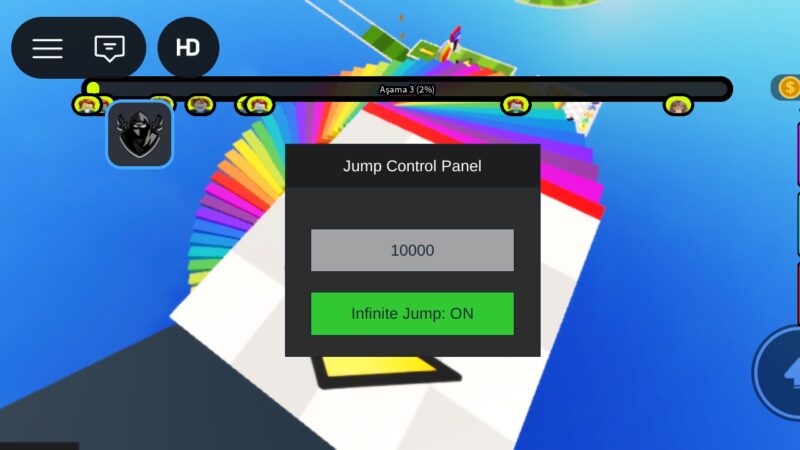
- Draggable Control Panel GUI: A clean, minimalistic in-game menu interface that can be moved anywhere on your screen.
- Optimized Performance: Fully lightweight execution designed to prevent frame drops during gameplay.
How to Use
Configure & Fly: Use the draggable Jump Control Panel to toggle Infinite Jump ON or input a custom JumpPower value, then hit enter!
Copy the Script: Click the copy button to grab the loadstring/source code below.
Execute the Code: Open your trusted Roblox exploit executor while playing [Game Name] and paste the script.
Complete the Key System: If prompted, follow the simple key verification steps to unlock the utility.
Script
local Players = game:GetService("Players")
local UserInputService = game:GetService("UserInputService")
local LocalPlayer = Players.LocalPlayer
local Mouse = LocalPlayer:GetMouse()

-- GUI Oluşturma
local ScreenGui = Instance.new("ScreenGui", game.CoreGui)
local MainFrame = Instance.new("Frame", ScreenGui)
MainFrame.Size = UDim2.new(0, 180, 0, 150)
MainFrame.Position = UDim2.new(0.5, -90, 0.5, -75)
MainFrame.BackgroundColor3 = Color3.fromRGB(45, 45, 45)
MainFrame.Active = true
MainFrame.Draggable = true -- Paneli sürükleyebilirsin

-- Başlık
local Title = Instance.new("TextLabel", MainFrame)
Title.Size = UDim2.new(1, 0, 0, 30)
Title.Text = "Jump Control Panel"
Title.TextColor3 = Color3.new(1, 1, 1)
Title.BackgroundColor3 = Color3.fromRGB(30, 30, 30)

-- JumpPower Input
local JumpBox = Instance.new("TextBox", MainFrame)
JumpBox.Size = UDim2.new(0.8, 0, 0, 30)
JumpBox.Position = UDim2.new(0.1, 0, 0.4, 0)
JumpBox.PlaceholderText = "JumpPower (Örn: 100)"

-- Sonsuz Zıplama Butonu
local InfJumpBtn = Instance.new("TextButton", MainFrame)
InfJumpBtn.Size = UDim2.new(0.8, 0, 0, 30)
InfJumpBtn.Position = UDim2.new(0.1, 0, 0.7, 0)
InfJumpBtn.Text = "Infinite Jump: OFF"
InfJumpBtn.BackgroundColor3 = Color3.fromRGB(200, 50, 50)

-- Değişkenler
local InfJumpEnabled = false

-- Fonksiyonlar
JumpBox.FocusLost:Connect(function(enterPressed)
    if enterPressed then
        local val = tonumber(JumpBox.Text)
        if val and LocalPlayer.Character and LocalPlayer.Character:FindFirstChild("Humanoid") then
            LocalPlayer.Character.Humanoid.UseJumpPower = true
            LocalPlayer.Character.Humanoid.JumpPower = val
        end
    end
end)

InfJumpBtn.MouseButton1Click:Connect(function()
    InfJumpEnabled = not InfJumpEnabled
    InfJumpBtn.Text = InfJumpEnabled and "Infinite Jump: ON" or "Infinite Jump: OFF"
    InfJumpBtn.BackgroundColor3 = InfJumpEnabled and Color3.fromRGB(50, 200, 50) or Color3.fromRGB(200, 50, 50)
end)

-- Infinite Jump Mantığı
UserInputService.JumpRequest:Connect(function()
    if InfJumpEnabled and LocalPlayer.Character then
        local humanoid = LocalPlayer.Character:FindFirstChildOfClass("Humanoid")
        if humanoid then
            humanoid:ChangeState(Enum.HumanoidStateType.Jumping)
        end
    end
end)
Comments (0)

No comments yet. Be the first!